
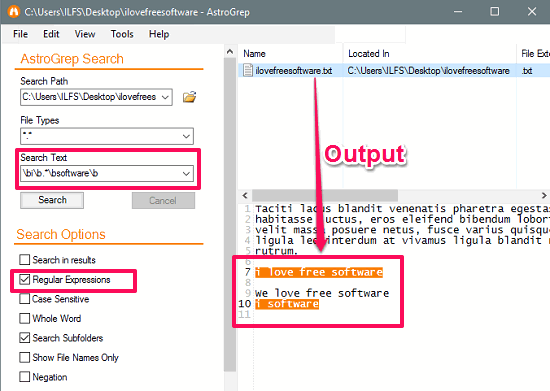
AstroGrep is a powerful and versatile Windows-based search utility designed to help users quickly find specific text within files. Unlike the traditional Windows search feature, AstroGrep focuses on text-based searches, allowing developers, IT professionals, and data analysts to locate information within a variety of file formats. It is especially popular among programmers and system administrators who need a fast, efficient, and accurate tool to search through codebases or large directories.
AstroGrep supports a wide range of file types, making it a valuable asset for anyone working with text-based content. Whether it’s source code, configuration files, documentation, or plain text logs, AstroGrep simplifies the process of finding relevant data. In this article, we’ll explore in detail the file types AstroGrep supports, how it handles each format, and why its flexibility makes it an essential part of modern development workflows.
Understanding AstroGrep File Compatibility
AstroGrep is built to search through files that contain readable text data. It does not rely on complex file indexing systems; instead, it directly scans the content of files for matching strings or expressions. This straightforward method allows AstroGrep to work efficiently across a broad range of file formats without requiring additional plugins or converters.
However, not every file type is suitable for AstroGrep. Since it specializes in text-based file analysis, it focuses on formats where the content is stored in plain or structured text, rather than binary data.
Plain Text Files (.txt)
The most basic and widely supported file type in AstroGrep is the plain text file (.txt). These files contain unformatted text and are often used for logs, notes, or configuration data.
AstroGrep can efficiently read and analyze large .txt files, even those containing thousands of lines. Its speed in handling text files makes it an ideal choice for developers who frequently manage text-based documents. The ability to use regular expressions (regex) enhances this feature, allowing users to pinpoint specific phrases, patterns, or variables within massive data sets.
Source Code Files (.c, .cpp, .java, .py, .js, .php, .cs, .rb, etc.)
Developers often rely on AstroGrep to search through source code files. Programming and scripting languages are typically written in text-based formats, which makes them perfect candidates for AstroGrep’s search capabilities.
AstroGrep supports a variety of source code file types, including:
- C and C++ files: .c, .cpp, .h
- Java files: .java
- Python scripts: .py
- JavaScript files: .js, .jsx
- PHP files: .php, .phtml
- C# files: .cs
- Ruby files: .rb
- Go files: .go
- HTML, CSS, and XML files: .html, .css, .xml
This extensive list makes AstroGrep an invaluable tool for developers managing multi-language projects. For example, a full-stack developer can search for a particular variable or function name across frontend and backend code simultaneously, saving considerable time and effort.
Configuration and Script Files (.ini, .cfg, .conf, .bat, .sh, .ps1)
Configuration and script files often contain essential instructions for software applications, servers, or operating systems. Because these files are written in plain text, AstroGrep can easily process and search through them.
Supported examples include:
- .ini and .cfg: Common for application or game configurations
- .conf: Often used in Linux and Apache settings
- .bat and .cmd: Windows batch scripts
- .sh: Unix/Linux shell scripts
- .ps1: PowerShell scripts
AstroGrep allows system administrators to quickly locate parameters, paths, or commands across multiple configuration files, which is especially useful in large IT environments or automated deployment pipelines.
Log Files (.log)
Log files record system activities, application events, and error messages. These files can grow significantly large, making manual searches difficult. AstroGrep excels in this area by offering fast text-based searches with line number references.
Supported log file formats include:
- Application logs (.log)
- System logs
- Debugging logs
- Custom event records
Because logs are plain text, AstroGrep can efficiently filter results based on timestamps, error codes, or specific keywords, helping developers and administrators quickly identify issues.
Markup and Data Files (.xml, .json, .yaml, .csv, .html)
AstroGrep also supports structured data and markup formats that are commonly used for configuration, web content, or data storage.
- XML (.xml): Extensible Markup Language files are used to store structured data in hierarchical form. AstroGrep can search for specific tags, attributes, or values.
- JSON (.json): Common in APIs and configuration files, JSON is fully supported by AstroGrep since it’s text-based. Users can locate keys, nested values, or configuration options easily.
- YAML (.yaml / .yml): Frequently used in DevOps pipelines, Docker, and Kubernetes configurations, YAML files are also readable and searchable by AstroGrep.
- CSV (.csv): Useful for spreadsheet-like data stored as plain text. AstroGrep can find entries or values quickly.
- HTML (.html / .htm): AstroGrep supports HTML documents, enabling searches within web page content, meta tags, or script blocks.
With these file types, AstroGrep becomes a multipurpose utility for developers, data scientists, and web engineers.
Markdown and Documentation Files (.md, .rst, .tex)
Documentation plays an important role in software development, and AstroGrep ensures these files are equally accessible for searching.
- Markdown (.md): Common in GitHub repositories and technical documentation.
- ReStructuredText (.rst): Frequently used in Python projects.
- LaTeX (.tex): Used for scientific papers and academic documentation.
AstroGrep allows content writers and developers to locate headings, definitions, or code references within these text-based documentation files efficiently.
Scripted Language Files (.pl, .vb, .lua, .ts)
AstroGrep’s flexibility extends to multiple scripting and automation languages. Since these file types are text-based, they are natively supported.
Supported examples:
- Perl scripts (.pl)
- Visual Basic scripts (.vb)
- Lua scripts (.lua)
- TypeScript files (.ts)
Developers using AstroGrep for these languages can easily search across large script directories to trace functions, variables, or workflow logic, simplifying debugging and code maintenance.
Structured Query Files (.sql)
Databases often use SQL scripts to manage queries, schemas, or stored procedures. AstroGrep supports .sql files, allowing users to search through database scripts to locate specific commands, field names, or relationships.
For instance, if a database administrator needs to find all instances where a particular table or column is referenced, AstroGrep can perform the search instantly, saving hours of manual work.
Makefiles and Build System Files (.make, .cmake, .gradle, .npmrc)
Build automation files are essential in modern development environments. These files define how software is compiled, packaged, or deployed. Since most build configuration files are text-based, AstroGrep supports them by default.
Examples include:
- Makefiles (.make, Makefile)
- CMake configuration (.cmake)
- Gradle build files (.gradle)
- NPM configuration (.npmrc)
By using AstroGrep, developers can quickly locate dependencies, version numbers, or build parameters within complex multi-module projects.
Office and Rich Text Files (Limited Support)
AstroGrep primarily supports plain text formats, meaning binary or rich-text formats like Microsoft Word (.doc, .docx) or PDF files are not natively readable. However, if such documents are saved or exported as plain text, AstroGrep can process them effectively.
For example, saving a .docx file as .txt allows AstroGrep to index and search it. This limitation highlights AstroGrep’s focus on text-based content rather than graphical or binary documents.
Ignored or Unsupported File Types
AstroGrep does not support files that store data in binary or compressed formats where the text is not human-readable. Examples include:
- Executable files (.exe, .dll, .bin)
- Image files (.jpg, .png, .gif, .bmp)
- Audio files (.mp3, .wav)
- Video files (.mp4, .avi)
- Compressed archives (.zip, .rar, .7z)
While users can still include these in searches, AstroGrep will not yield meaningful results because such files lack readable text data.
Customizable File Filters
One of AstroGrep’s most useful features is its ability to customize file filters. Users can define which file extensions to include or exclude in searches. For example, if you only want to search Python and JavaScript files, you can specify *.py; *.js in the file filter option.
This customization allows for faster and more targeted searches, especially when working on projects that include hundreds of file types. AstroGrep’s filtering system ensures that irrelevant files are skipped, improving performance and accuracy.
Regular Expressions and Advanced Matching
Beyond just file types, AstroGrep’s support for regular expressions (regex) enhances how it interacts with different formats. Regex allows users to define search patterns, such as specific tags, keywords, or syntax structures within files.
This feature is particularly useful for:
- Finding all function definitions across multiple code files
- Locating specific XML attributes or JSON keys
- Identifying repeated patterns in log files
Regardless of the file type, AstroGrep’s advanced matching engine ensures that users can extract meaningful insights efficiently.
Handling Large Directories and Nested Folders
AstroGrep is optimized for scanning large file systems containing diverse file types. It can recursively search through nested directories and process thousands of files in a single operation.
Whether the folder contains C++ code, HTML templates, or YAML configuration files, AstroGrep maintains consistent performance. The combination of customizable filters, line-number display, and context previews makes it a professional-grade solution for code and data analysis.
Use Cases by Industry
AstroGrep’s file support benefits professionals across multiple industries:
- Software Development: Searching across source code files for debugging or refactoring.
- IT Administration: Locating configuration parameters or script commands.
- Web Development: Scanning through HTML, CSS, or JavaScript files.
- Data Analytics: Searching within CSV or JSON data exports.
- Education and Research: Navigating through text-based reports or documentation.
This versatility ensures AstroGrep’s relevance across various technical disciplines.
Why File Type Support Matters
The wide file-type compatibility of AstroGrep directly enhances its efficiency and user experience. Instead of switching between multiple tools, professionals can rely on a single platform to search across an entire project directory.
Its support for diverse text-based formats ensures that no matter what type of file you’re working with—code, config, or data—AstroGrep can locate what you need without unnecessary complexity.
Conclusion
AstroGrep stands out as one of the most effective text search utilities available for Windows users due to its extensive support for a wide range of file types. From source code and configuration files to logs and documentation, AstroGrep efficiently processes text-based formats, making it indispensable for developers, system administrators, and researchers. While it is not designed for binary or rich-text files, its customizable filters, regex support, and speed make it ideal for large-scale text searches. In short, AstroGrep’s compatibility with multiple file types ensures accuracy, consistency, and productivity across every stage of a technical workflow.