
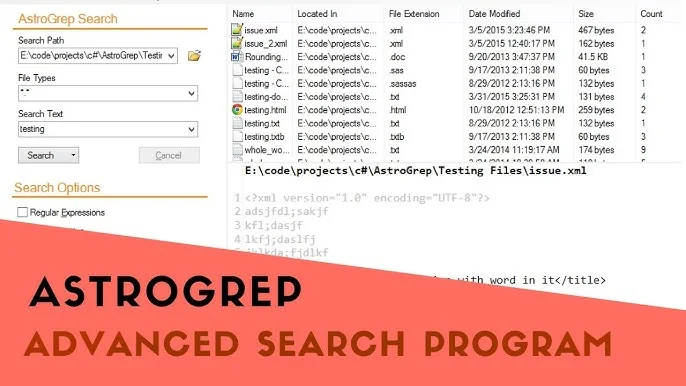
AstroGrep is a lightweight yet powerful search utility designed for Windows users who need to quickly search text within files. Similar to the classic UNIX “grep” tool, AstroGrep simplifies file content searching with a friendly graphical interface, making it ideal for programmers, writers, and system administrators alike. Its intuitive features, combined with fast performance, have made it a go-to tool for anyone managing large volumes of code, documents, or logs.
AstroGrep stands out for its open-source nature and accessibility. Users often ask, “Is AstroGrep free to use?” This article provides a complete answer by exploring its licensing model, key features, limitations, use cases, and overall benefits. By the end, you will clearly understand not only whether AstroGrep is free but also what makes it an excellent choice among file search tools.
Understanding AstroGrep
AstroGrep is a Windows-based text search utility that helps users find specific words or phrases within multiple files. It’s inspired by the original GREP (Global Regular Expression Print) command found in UNIX systems but eliminates the complexity of command-line usage by providing a user-friendly graphical interface.
It allows users to specify file types, apply regular expressions, and view matching lines directly in the results window. Each match can be double-clicked to open the file at the exact line containing the searched term. This functionality makes AstroGrep particularly useful for software developers who need to navigate through extensive codebases or configuration files.
Licensing and Cost: Is AstroGrep Free to Use?
Open Source License
AstroGrep is completely free to use, both for personal and commercial purposes. It is distributed under an open-source license, which means the software’s source code is publicly available. Anyone can download, modify, and redistribute it according to the license terms, provided proper credit is given to the original developers.
No Paid Versions or Subscriptions
Unlike many modern search utilities that follow freemium or subscription-based models, AstroGrep has no hidden fees, paid upgrades, or restricted features. All core functionalities are included in the free version, ensuring users can take advantage of its full potential without financial constraints.
Community-Driven Development
The open-source nature of AstroGrep encourages community contributions. Developers worldwide can suggest improvements, fix bugs, or even create custom builds. This community collaboration ensures ongoing updates, stability, and performance enhancements — all without charging users.
Key Features of AstroGrep
File Content Searching
AstroGrep’s main feature is its ability to search inside text files. You can scan thousands of files simultaneously to locate specific keywords, phrases, or code snippets. This feature is essential for programmers who need to trace variable names, functions, or dependencies across multiple files.
Regular Expressions Support
Regular expressions (regex) allow advanced users to perform complex search patterns. AstroGrep fully supports regex syntax, enabling precise filtering of results and making it versatile for searching structured data or logs.
File Type Filtering
Users can limit searches to specific file extensions, such as .txt, .log, .html, or .cpp. This saves time and ensures more relevant results when dealing with diverse directories containing different file types.
Match Highlighting
When a search term is found, AstroGrep highlights the exact text match in the result pane. This visual aid allows users to quickly identify relevant information without scanning entire files manually.
Exporting Search Results
Users can export search results to text files for further analysis, reporting, or documentation. This feature is especially useful for software quality assurance or data analysis workflows.
Fast and Efficient Search Engine
AstroGrep is optimized for speed. Even when searching through thousands of files or gigabytes of data, it delivers results quickly, minimizing downtime during development or troubleshooting sessions.
Portable and Lightweight
The application does not require installation. Users can run it from a USB drive or external disk, making it a perfect tool for on-the-go troubleshooting or remote system access.
Syntax Highlighting
In the latest versions, AstroGrep includes syntax highlighting support for various programming languages. This enhances readability when viewing results directly within the software.
Why AstroGrep is Free
Philosophy of Open Source
AstroGrep is built on the open-source philosophy — promoting collaboration, transparency, and accessibility. Its developers believe in creating tools that empower users without commercial barriers. The open-source community thrives on mutual benefit, where contributors gain experience while providing valuable software to others.
Volunteer-Based Development
The project is maintained by volunteers and contributors who dedicate time and expertise to enhance its functionality. Since there’s no corporate backing or financial agenda, the project remains free for all users.
Community Support Model
Instead of selling licenses or subscriptions, AstroGrep relies on its global user base for feedback, testing, and contributions. This organic support system reduces costs and ensures continuous improvement.
Educational and Professional Benefits
Open-source projects like AstroGrep often serve as educational platforms. Developers use the source code to learn software design patterns, UI development, and performance optimization — an exchange of knowledge that benefits both the contributors and the community.
Comparing AstroGrep to Paid Alternatives
Cost Efficiency
Paid search tools like Agent Ransack or FileLocator Pro may offer advanced enterprise features, but for most users, AstroGrep provides all necessary capabilities at no cost. This makes it ideal for small businesses, freelancers, or educational institutions.
Ease of Use
Many paid alternatives include complex configurations or analytics modules that casual users don’t need. AstroGrep’s minimal interface focuses solely on text search, ensuring simplicity without compromising effectiveness.
Open Source vs. Proprietary Control
With AstroGrep, users have full control over the software. They can inspect the code, verify security, and even customize the tool for personal use — privileges often unavailable with proprietary tools.
Feature Comparison
While premium tools may integrate database indexing, file preview panels, or cloud support, AstroGrep covers the core need: fast, accurate, and local file searching. For developers and general users alike, this is often sufficient.
Use Cases for AstroGrep
Software Development
Developers use AstroGrep to locate functions, variable names, or error messages within extensive codebases. It’s especially useful when working on legacy projects where documentation may be incomplete.
System Administration
System administrators rely on AstroGrep to search configuration files, logs, or scripts to diagnose system issues or audit changes efficiently.
Content Management
Writers and editors can use AstroGrep to find specific words or phrases across large document collections, ensuring consistency and detecting repetition.
Data Analysis
Researchers handling structured text data (like CSV or JSON files) can employ AstroGrep to extract key information without opening each file manually.
Education and Learning
AstroGrep serves as a learning tool for programming students studying pattern matching or text parsing, helping them visualize regular expression outputs in real time.
Advantages of Using AstroGrep
- Free Forever: No licensing fees or restrictions.
- Simple Interface: Easy for beginners and professionals.
- High Performance: Efficient search even on large datasets.
- Portable Use: Can run from removable drives.
- Community Support: Regular improvements by developers worldwide.
- Secure and Transparent: Source code is open for audit.
- Customizable: Developers can tailor it to personal workflows.
Limitations of AstroGrep
While AstroGrep offers significant benefits, it’s essential to note some limitations:
- Windows Only: AstroGrep is primarily designed for Windows and lacks official support for macOS or Linux.
- No Real-Time Monitoring: It doesn’t automatically detect file changes; users must rerun searches.
- Limited Preview Options: It doesn’t provide full document previews for non-text formats like PDF or DOCX.
- Minimal UI Customization: The interface, while clean, offers limited layout adjustments.
- No Integrated File Editing: Users need external editors to modify files containing search results.
Despite these limitations, AstroGrep remains a dependable, efficient, and accessible solution for everyday file searching tasks.
How to Download and Use AstroGrep
Although this article avoids direct links, AstroGrep can easily be found on trusted open-source repositories and software hosting platforms. Installation is straightforward — typically involving downloading the ZIP package and running the executable file.
Basic Usage Steps:
- Launch AstroGrep and select the folder or directory you want to search.
- Enter your search term or regular expression.
- Define file filters (like .txt, .cs, .html) if needed.
- Click Search and wait for results.
- Double-click any match to open the file directly at the located line.
The interface is self-explanatory, making it accessible even for users with limited technical experience.
AstroGrep for Professional Environments
AstroGrep’s combination of speed and simplicity makes it well-suited for professional use in software houses, IT departments, and research institutions. Since it’s free and open-source, organizations can deploy it across multiple systems without licensing concerns. Moreover, its lightweight design ensures compatibility with older machines or minimal-resource environments.
Businesses often appreciate its transparency — knowing exactly what the software does and how it handles data. This makes AstroGrep a secure alternative to proprietary tools that may transmit or store search logs externally.
Future Development and Community Involvement
AstroGrep’s development continues to evolve, with periodic updates focusing on stability, performance, and modern interface improvements. The community regularly proposes new features such as syntax highlighting, dark mode, and advanced result filtering.
Users interested in contributing can join discussions, suggest feature requests, or test beta versions. The open-source nature of AstroGrep ensures it remains a living project, adapting to user needs and modern computing standards.
Why You Should Choose AstroGrep
If you’re looking for a cost-free, reliable, and efficient text search tool, AstroGrep is an ideal choice. It provides all essential features without unnecessary complexity or subscription costs. Whether you’re a developer debugging code, an administrator auditing logs, or a writer reviewing documents, AstroGrep can save time and streamline your workflow.
Its zero-cost model, combined with open-source transparency, gives users confidence in both functionality and security. The absence of ads, telemetry, or paywalls adds to its credibility as a truly user-focused application.
Conclusion
AstroGrep is entirely free to use, open-source, and accessible to everyone—from beginners to professionals. It delivers high-speed file content searching with precision, efficiency, and user-friendly operation. The tool’s simplicity, portability, and zero-cost structure make it a standout choice in the world of file search utilities.
AstroGrep continues to prove that powerful software doesn’t have to come with a price tag. Supported by a global community of developers and users, it exemplifies the best of open-source collaboration. For anyone needing a dependable, fast, and cost-free search solution, AstroGrep remains one of the most trustworthy tools available today.